
To help you type more accurately, your iPad includes the same feature found on iPhone and iPod touch, namely "Auto-Correction". When your iPad thinks that you have mistyped a word, it will automatically correct to the word it thinks you wanted to type instead. While very helpful, this feature can become a hindrance depending on the type of text you usually type on your iPad. This tutorial will explain how to turn off, or disable Auto-Correction on your iPad:
 Click on the "Home" button, and navigate through Home screens to find the "Settings" icon, and tap on it.
- When the iPad Settings screen opens, tap on "General" settings on the left (should be automatically selected).
- In the fifth group of preferences, tap on "Keyboard" button. Your iPad will load the 4 keyboard-related settings, and the International Keyboards option we'll discuss later.
- Notice that the first button reads "Auto-Correction" - to change (turn on or turn off), simply tap the button; if the button reads "Off", it means that Auto-Capitalization is already turned off on your iPad (not that you need to tap the button to turn if off). The preference is now disabled.
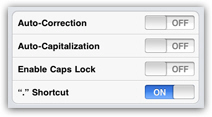
- This change of setting takes effect immediately, and you will enjoy the new option as soon as you start typing next time - with Auto-Correction disabled, your iPad will no longer suggest matches as you type in any kind of text field.
Note that the Auto-Correction setting can be turned on or off at will, and very easily / quickly as you've just seen. Simply enable or disable it as needed, since in many cases your iPad can be quite helpful if you become familiar with its text replacement behavior (and the feature will save you quite a few keystrokes).